CHAR(n): fixed length character string,with user-specified length
VARCHAR(n): variable length character string,with user-specified maximum length
INT or INTEGER: integer number
SMALLINT: small integer number
NUMERIC(p, d): fixed point number with user-specified precision and scale(总共为p位有效位,其中小数点后有d位)
FLOAT(n): floating point number with user-specified precision,if n is omitted,the precision is 24
REAL: floating point number with user-specified precision,such as 3.14,REAL is equivalent to FLOAT(24)
DOUBLE or DOUBLE PRECISION: double precision floating point number
NULL: no value
DATE: date in the format YYYY-MM-DD,such as 2025-03-01
TIME: time in the format HH:MM:SS,such as 12:00:00
TIMESTAMP: date and time in the format YYYY-MM-DD HH:MM:SS,such as 2025-03-01 12:00:00
SQL provides various functions for data manipulation and type conversion, though the implementation may vary across different database systems. Here are some examples:
String functions:
CHAR(n): Convert ASCII code n to character,in Oracle,it is CHR(n)
SUBSTRING(str, start, length): Extract substring from position start with given length,in Oracle,it is SUBSTR(str, start, length)
LEN(str): Get length of string,in Oracle,it is LENGTH(str)
GETDATE(): Get current date and time,in Oracle,it is SYSDATE
DATALENGTH(str): Get number of bytes used to represent string
CONCAT(str1, str2): Concatenate two or more strings
UPPER(str): Convert string to uppercase
LOWER(str): Convert string to lowercase
LTRIM(str): Remove leading spaces
RTRIM(str): Remove trailing spaces
Numeric functions:
ABS(n): Absolute value
ROUND(n, d): Round number to d decimal places
CEILING(n): Round up to nearest integer
FLOOR(n): Round down to nearest integer
POWER(x, y): x raised to power y
SQRT(n): Square root
Date functions:
GETDATE(): Current date and time
DATEADD(part, n, date): Add n units to date
DATEDIFF(part, date1, date2): Difference between dates
YEAR(date): Extract year
MONTH(date): Extract month
DAY(date): Extract day
Create Table
An SQL relation is define using the CREATE TABLE statement.
CREATE TABLE r (
    A1 D1,
    A2 D2,
    ...,
    An Dn,
    (integrity constraint1),
    ...,
    (integrity constraintk)
);
r is the name of the relation
Each Ai is an attribute name in the schema of relation r
Di is the data type of values in the domain of attribute Ai
integrity constrainti is a constraint on the values of attribute Ai,即完整性约束条件,例如外键约束,主键约束,唯一约束,检查约束等
the drop table statement is used to delete a table from the database.
DROPTABLE employees;
Alter Table
the alter table statement is used to modify the structure of a table.
the format is
ALTER TABLE table_name ADD column_name data_type;
-- add a new columnALTER TABLE table_name ADD (column_name data_type, column_name data_type, ...);
-- add multiple columnsALTER TABLE table_name DROPCOLUMN column_name;
-- drop a columnALTER TABLE table_name MODIFY column_name data_type;
-- modify the data type of a column
ALTER TABLE employees ADDCOLUMN email VARCHAR(100);
Create Index
Index is a data structure that improves the performance of database queries by allowing the database to quickly locate the data without having to scan the entire table.
CREATE INDEX index_name ON table_name(attribute_list);
-- unique indexCREATEUNIQUE INDEX index_name ON table_name(attribute_list);
-- drop indexDROP INDEX index_name;
Example:
CREATE INDEX idx_last_name ON employees(last_name);
Basic Structure
The select clause
The select clause is used to select the data from the database.
SELECT attribute_list FROM table_name;
such as:
SELECT*FROM employees;
where * is the wildcard character, it means all the attributes.
SQL allows duplicates in relations as well as in query results.
SELECTDISTINCT attribute_list FROM table_name;
where DISTINCT is used to remove duplicates.
the opposite of DISTINCT is ALL, which means all the duplicates are kept.
SELECTALL attribute_list FROM table_name;
By default, the select clause returns all the attributes of the relation.
The where clause
The where clause is used to filter the data from the database.
SELECT attribute_list FROM table_name WHEREcondition;
such as:
SELECT*FROM employees WHERE salary >5000;
Comparison results can be combined using the logical connectives:
AND: Both conditions must be true
OR: At least one condition must be true
NOT: Negates a condition
The BETWEEN operator can be used to specify a range:
SELECT loan_number, amount
FROM loan
WHERE amount BETWEEN1000AND10000AND branch_name ='Downtown';
The IN operator can be used to specify a list of values:
SELECT loan_number, amount
FROM loan
WHERE amount IN (1000, 2000, 3000);
The from clause
The from clause is used to specify the table from which to select the data.
SELECT attribute_list FROM table_name1, table_name2, ...;
such as:
SELECT branch_name, branch_city
FROM branch, account
WHERE branch.branch_name = account.branch_name;
This will return a Cartesian product of the two tables.
if there are multiple tables contain the same attribute, we need to use the table name to specify the attribute.
SELECT branch.branch_name, branch_city, account.account_number
FROM branch, account
WHERE branch.branch_name = account.branch_name;
The rename operation
The rename operation is used to rename the attributes of the relation.
SELECT attribute_list AS new_attribute_list FROM table_name;
such as:
SELECT branch_name AS branch, branch_city AS city
FROM branch;
Tuple variables are defined in the FROM clause via the use of the as clause.
SELECT customer_name, T.loan_number, S.amount
FROM borrower as T, loan as S
WHERE T.loan_number = S.loan_number
AND S.amount >10000;
In SQL, the use of the AS keyword to define the table alias is optional. The alias can be defined directly in the FROM clause without using the AS keyword. Therefore, you can remove the AS keyword, and the code will still work. Here is the code without the AS keyword:
SELECT customer_name, T.loan_number, S.amount
FROM borrower T, loan S
WHERE T.loan_number = S.loan_number
AND S.amount >10000;
Question
Find the names of all branches that have greater assets than some branch located in city Brooklyn.
SELECTDISTINCT T.branch_name
FROM branch AS T, branch AS S
WHERE T.assets > S.assets
AND S.branch_city ='Brooklyn';
String operation
fuzzy matching
SQL includes a string-matching operator for comparisons on character strings. Patterns are described using the following two special characters:
%: Matches any sequence of characters
_: Matches any single character
with this,we can achieve the fuzzy matching.
SELECT*FROM employees WHERE last_name LIKE'S%';
This will return all the employees whose last name starts with 'S'.
SELECT*FROM employees WHERE last_name LIKE'_o%';
This will return all the employees whose last name has 'o' as the second character.
It should be use in the where clause and must be used in conjunction with the LIKE operator.
other string operations
SQL provides the || operator to concatenate strings.
ordering the display of results is achieved by using the ORDER BY clause.
SELECT attribute_list FROM table_name WHEREconditionORDERBY attribute_name;
We may specify desc for descending order or asc for ascending order, and for each attribute, ascending order is the default.
SELECT*FROM employees ORDERBY salary DESC;
This will return all the employees sorted by salary in descending order.
SET Operations
In SQL, use the set operations including UNION, INTERSECT, and EXCEPT operate on relations as well as correspond to the relational algebra operations ∪, ∩, and ∖.
Each of the operations including UNION, INTERSECT, and EXCEPT automatically eliminates duplicates. To retain duplicates, use UNION ALL, INTERSECT ALL, and EXCEPT ALL instead.
Example
Find all customers who have a loan or an account or both.
SELECT customer_name FROM borrower
UNIONSELECT customer_name FROM depositor;
Find all customers who have both a loan and an account.
SELECT customer_name FROM borrower
INTERSECTSELECT customer_name FROM depositor;
Find all customers who have a loan but not an account.
SELECT customer_name FROM borrower
EXCEPTSELECT customer_name FROM depositor;
Aggregate Functions
Aggregate functions are used to perform calculations on a set of values(a column) and return a single value.
COUNT: Counts the number of rows
SUM: Calculates the sum of a set of values
AVG: Calculates the average of a set of values
MAX: Finds the maximum value
MIN: Finds the minimum value
Such as:
SELECTCOUNT(*) as total_employees FROM employees;
This will return the number of rows in the employees table.
Note
The COUNT(*) function counts all rows, including those with null values.
But COUNT(attribute_name) function counts only the rows where the attribute is not null.
We can also use COUNT(distinct attribute_name) to count the number of distinct values in a column.
Group By
SELECT branch_name, avg(balance) avg_bal
FROM account
WHERE branch_name ='Perryridge';
在 SQL 中,当你在 SELECT 子句中使用聚合函数(例如 AVG、SUM 等)时,所有不在聚合函数中的属性(字段)必须出现在 GROUP BY 子句中。这是因为 SQL 需要知道如何对数据进行分组,以便正确地计算聚合值。
flowchart LR
    A[From] --> B[Where]
    B --> C[Group By / aggregate]
    C --> D[Having]
    D --> E[Select]
    E --> F[Distinct]
    F --> G[Order By]
Note that predicates in the having clause are applied after the formation of groups, whereas predicates in the where clause are applied before forming groups.
Null Values
Null is a special marker used in SQL and was first introduced by E.F. Codd in 1974.
The meaning of null is that the value is unknown or not applicable.
The result of any arithmetic operation involving null is null.
5+null = null
Any comparison involving null is 'unknown', which is neither true nor false.
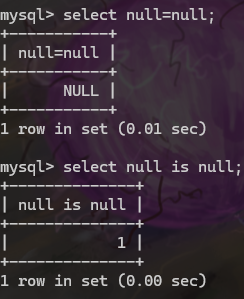
null = null is unknown
unknown
Three-valued logic using the truth value unknown: (true, false, unknown)
OR operation:
(unknown OR true) = true
(unknown OR false) = unknown
(unknown OR unknown) = unknown
AND operation:
(unknown AND true) = unknown
(unknown AND false) = false
(unknown AND unknown) = unknown
NOT operation:
(NOT unknown) = unknown
= operation:
(unknown = unknown) = unknown
!= operation:
(unknown != unknown) = unknown
The predicate IS NULL and IS NOT NULL are used to test for null values.
recall that the primary key of a relation cannot be null.
Example
Find all loan number which appears in the loan relation with null values for amount.
SELECT loan_number
FROM loan
WHERE amount ISNULL;
we cannot use = to test for null values,the result will return null.
see as follows:
Null Values in Aggregate Functions
SELECTsum(balance) FROM account;
This will return the sum of the balance of all the accounts.Result is null if there is no non-null values.
All aggregate operations except count(*) ignore tuples with null values on the aggregated attributes.
Nested Subqueries
Nested subqueries in SQL are queries within queries. They allow you to perform more complex queries by embedding one query inside another. This is particularly useful when you need to filter data based on the results of another query.
Basic Structure
A nested subquery is typically found in the WHERE clause of a SQL statement. The subquery is executed first, and its result is used by the outer query.
SELECT column1, column2
FROM table1
WHERE column3 <operator> (
SELECT column3
FROM table2
WHEREcondition
);
the <operator> can be =, !=, >, >=, <, <=, IN, NOT IN, ANY, ALL, EXISTS, NOT EXISTS.
it can also be nested in the FROM clause.
SELECT column1, column2
FROM (SELECT column3 FROM table2 WHEREcondition) as subquery;
or in the having clause such as:
SELECT department, AVG(salary) AS avg_salary
FROM employees
GROUPBY department
HAVINGAVG(salary) > (SELECTAVG(salary) FROM employees);
找出每个 [部门平均工资] 大于[所有员工平均工资]的部门。
Example
Find all customers who have both an account and a loan at the bank.
SELECT customer_name
FROM borrower
WHERE customer_id IN (
    SELECT customer_id
    FROM depositor
);
recall that we can also use the set operation to achieve the same result.
SELECT customer_name
FROM borrower
INTERSECTSELECT customer_name FROM depositor;
Find all customers who have both an account and a loan at the Perryridge branch.
query 1:
SELECTDISTINCT customer_name
FROM borrower B, loan L
WHERE B.loan_number = L.loan_number
AND branch_name ='Perryridge'AND (branch_name, customer_name) IN (
SELECT branch_name, customer_name
FROM depositor D, account A
WHERE D.account_number = A.account_number
);
query 2:
SELECTDISTINCT customer_name
FROM borrower B, loan L
WHERE B.loan_number = L.loan_number
AND branch_name ='Perryridge'AND customer_name IN (
SELECT customer_name
FROM depositor D, account A
WHERE D.account_number = A.account_number
AND branch_name ='Perryridge'
);
query 3:指定名称,将外层的结果传递进去
SELECTDISTINCT customer_name
FROM borrower B, loan AS t
WHERE B.loan_number = t.loan_number
AND branch_name ='Perryridge'AND customer_name IN (
SELECT customer_name
FROM depositor D, account A
WHERE D.account_number = A.account_number
AND branch_name = t.branch_name -- branch_name is the same as the branch_name in the outer (Perryridge)
);
Find the account_number with the maximum balance for every branch.
SELECT account_number, balance
FROM account
WHERE balance >=max(balance)
GROUPBY branch_name
错,聚合函数不能在where子句中使用
SELECT account_number, max(balance)
FROM account
GROUPBY branch_name
错误,account_number不是聚合函数的一部分,且没有在group by子句中
正确的为
-- Select account number and balance from the account tableSELECT account_number AS AN, balance
FROM account A
-- Filter to get accounts with the maximum balance in each branchWHERE balance >= (
-- Subquery to get the maximum balance for each branchSELECTmax(balance)
FROM account B
WHERE A.branch_name = B.branch_name
)
-- Order the results by balanceORDERBY balance;
但是
SELECT account_number, balance
FROM account
GROUPby branch_name
HAVING balance >=max(balance)
ORDERby balance
错误,max(balance)是聚合列,balance不是聚合列
Set Comparison
Find all branches that have greater assets than some branch located in Brooklyn.
SELECT branch_name
FROM branch
WHERE assets >SOME (
SELECT assets
FROM branch
WHERE branch_city ='Brooklyn'
);
Find all branches that have greater assets than all branches located in Brooklyn.
SELECT branch_name
FROM branch
WHERE assets >ALL (
SELECT assets
FROM branch
WHERE branch_city ='Brooklyn'
);
or
SELECT branch_name
FROM branch
WHERE assets > (SELECTMAX(assets) FROM branch WHERE branch_city ='Brooklyn');
Test for Empty Relations
The exists construct returns the value true if the argument subquery is non-empty.
existsr equal to r=∅
not existsr equal to r=∅
Example
Find all customers who have accounts at all branches located in city Brooklyn.
SELECTDISTINCT S.customer_name
FROM depositor AS S
WHERENOTEXISTS (
(SELECT branch_name
FROM branch
WHERE branch_city ='Brooklyn')
EXCEPT
(SELECTDISTINCT R.branch_name
FROM depositor AS T, account AS R
WHERE T.account_number = R.account_number
AND S.customer_name = T.customer_name)
);
SELECTDISTINCT S.customer_name
FROM depositor AS S
WHERENOTEXISTS (
SELECT*FROM branch B
WHERE branch_city ='Brooklyn'ANDNOTEXISTS (
SELECT*FROM depositor AS T, account AS R
WHERE T.account_number = R.account_number
AND R.branch_name = B.branch_name
AND S.customer_name = T.customer_name
)
);
The unique construct tests whether a subquery has any duplicate tuples in its result.
Example
Find all customers who have at most one account at the Perryridge branch.
SELECT customer_name
FROM depositor AS T
WHEREUNIQUE (
SELECT R.customer_name
FROM account, depositor AS R
WHERE T.customer_name = R.customer_name
AND R.account_number = account.account_number
AND account.branch_name ='Perryridge'
);
Find all customers who have at least two accounts at the Perryridge branch.
SELECTDISTINCT T.customer_name
FROM depositor AS T
WHERENOTUNIQUE (
SELECT R.customer_name
FROM account, depositor AS R
WHERE T.customer_name = R.customer_name
AND R.account_number = account.account_number
AND account.branch_name ='Perryridge'
);
Views
A view is a virtual table that is defined by a query. It is a stored query that can be used to simplify complex queries and to provide a consistent view of the data.
Provide a mechanism to hide certain data from the view of certain users.
Create View
CREATEVIEW view_name ASSELECT attribute_list FROM table_name WHEREcondition;
-- orCREATEVIEW view_name (c1, c2, ..., cn) ASSELECT attribute_list FROM table_name WHEREcondition;
Advice
Benefits of using views
Security
Easy to use, support logical independence
Simplify complex queries
Hide certain data from the view of certain users
Drop View
DROPVIEW view_name;
Example
Create a view consisting of branches and their customer names.
CREATEVIEW all_customer AS
(
(SELECT branch_name, customer_name
FROM depositor, account
WHERE depositor.account_number = account.account_number)
UNION
(SELECT branch_name, customer_name
FROM borrower, loan
WHERE borrower.loan_number = loan.loan_number)
);
Derived Relations
In SQL, Derived Relations (derived relations) are created through subqueries (subquery) in the FROM clause. They are typically used to simplify complex queries and make them more readable.
Such as:Find the average account balance of those branches where the average account balance is greater than $500.
SELECT branch_name, avg_bal
FROM (SELECT branch_name, avg(balance)
FROM account
GROUPBY branch_name)
asresult (branch_name, avg_bal)
WHERE avg_bal >500
The derived table must have its own alias
With Clause
The WITH clause allows views to be defined locally for a query, rather than globally.
WITH 子句允许在查询中局部定义视图,而不是全局定义。这意味着你可以在一个特定的查询中创建一个临时的视图,这个视图只在该查询的上下文中可用,而不会影响数据库的其他部分。这种方法的好处是可以简化复杂查询,使其更易于阅读和维护,同时避免在数据库中创建永久视图。使用 WITH 子句,你可以在查询中定义多个子查询,并在主查询中引用它们,从而提高查询的可读性和效率。
Such as:Find all accounts with the maximum balance.
WITH max_balance(value) AS (
SELECTmax(balance)
FROM account
)
SELECT account_number
FROM account, max_balance
WHERE account.balance = max_balance.value;
Modification of Database
Deletion
DELETEFROM table_name WHEREcondition;
such as: Delete all accounts and relevant information at depositor for every branch located in Needham city.
DELETEFROM account
WHERE branch_name IN (
SELECT branch_name
FROM branch
WHERE branch_city ='Needham'
);
DELETEFROM depositor
WHERE account_number IN (
SELECT account_number
FROM branch B, account A
WHERE branch_city ='Needham'AND B.branch_name = A.branch_name
);
以下写法错误
DELETEFROM account, depositor, branch
WHERE account.account_number = depositor.account_number
AND branch.branch_name = account.branch_name
AND branch_city ='Needham';
每一个delete语句,只能够针对一个表进行操作,不能够针对多个表进行操作。
Example2:
Delete the record of all accounts with balances below the average at the bank.
DELETEFROM account WHERE balance < (SELECTavg(balance) FROM account);
Problem: as we delete tuples from account, the average
balance changes.
Solution:
WITH avg_balance AS (
SELECTavg(balance) AS avg_bal
FROM account
),
to_delete AS (
SELECT account_number
FROM account
WHERE balance < (SELECT avg_bal FROM avg_balance)
)
DELETEFROM account
WHERE account_number IN (SELECT account_number FROM to_delete);
INSERT INTO account (account_number, branch_name, balance)
VALUES ('A_9732', 'Perryridge', 1200);
-- or equivalentlyINSERT INTO account (branch_name, balance, account_number)
VALUES ('Perryridge', 1200, 'A_9732');
Such as:Provide as a gift for all loan customers of the Perryridge branch, a $200 savings account. Let the loan number serve as the account number for the new savings account.
-- Step 1: insert into accountINSERT INTO account (account_number, branch_name, balance)
SELECT loan_number, branch_name, 200FROM loan
WHERE branch_name ='Perryridge';
-- Step 2: insert into depositorINSERT INTO depositor (customer_name, account_number)
SELECT customer_name, A.loan_number
FROM loan A, borrower B
WHERE A.branch_name ='Perryridge'AND A.loan_number = B.loan_number;
SQL provides two types of large object data types:
BLOB (Binary Large Object)
Stores large collections of uninterpreted binary data
Examples: images, videos, CAD files
Interpretation is handled by external applications
Maximum size depends on DBMS implementation
CLOB (Character Large Object)
Stores large collections of character/text data
Examples: documents, XML files, long text
Data is interpreted as character strings
Maximum size depends on DBMS implementation
When querying large objects, the database returns a pointer/reference to the data rather than the full object itself. This helps optimize performance and memory usage.
Example usage:
CREATE TABLE students (
sid char(10) PRIMARY KEY,
name varchar(10),
gender char(1),
photo blob(20MB),
cv clob(10KB)
);
Integrity Constraints
Integrity constraints guard against accidental damage to the database, by ensuring that authorized changes to the database do not result in a loss of data consistency.
The check clause in SQL-92 permits domains to be restricted:
Create domain hourly-wage numeric(5, 2)
Constraintvalue-test check(value>=4.00)
--The clause constraint value-test is optional; useful to indicate which constraint an update violated.
为约束命名可以更容易地诊断问题;
Referential Integrity
Let r1(R1) and r2(R2) be the relations with primary keys K1 and K2, respectively.
The subset α of R2 is a foreign key referencing K1 in relation r1, if for every t2 in r2 there must be a tuple t1 in r1 such that t1[K1]=t2[α].
∀t2∈r2,∃t1∈r1,t1[K1]=t2[α]
Referential integrity constraint also called subset dependency, since its can be written as
INSERT:If a tuple t2 is inserted into r2, the system must ensure that there is a tuple t1 in r1 such that t1[K1]=t2[α], 例如如果插入一个员工,则该员工所属的branch_name必须在branch表中存在。
DELETE: If a tuple t1 is deleted from r1, the system must compute the set of tuples in r2 that reference t1:
σα=t1[K1](r2)
如果r2中存在与r1中被删记录匹配的元组
If this set is not empty, then either the delete command is rejected as an error, or the tuples in t2 that references t1 must themselves be deleted (cascading deletions are possible).
UPDATE CASE 1: If a tuple t2 is updated in relation r2 and the update modifies values for foreign key α, then a test similar to the insert case is made:
Let t2′ denote the new value of tuple t2. The system must ensure that
UPDATE CASE 2: If a tuple t1 is updated in relation r1 and the update modifies values for candidate key K, then a test similar to the delete case is made:
Either the update command is rejected as an error, or the tuples in t2 that references t1 must themselves be updated(cascading updates are possible).
When an assertion is made, the system tests it for validity on every update that may violate the assertion. (when the predicate is true, it is Ok, otherwise report error.)
这种测试可能会带来大量的系统开销;因此,断言应该谨慎使用。
Example
if we require "the sum of all loan amounts for each branch must be less than the sum of all account balances at the branch".
But SQL does not provide a construct for asserting:
forall X, P(X)
So it is achieved in a round-about fashion, using:
notexists X, such that not P(X)
CREATE ASSERTION sum-constraintCHECK
(NOTEXISTS (SELECT*FROM branch B
WHERE
(SELECTSUM(amount) FROM loan
WHERE loan.branch-name = B.branch-name)
> (SELECTSUM(balance) FROM account
WHERE account.branch-name = B.branch-name)
)
);
Triggers
A trigger is a statement that is executed automatically by the system as a side-effect of a modification to the database.
To design a trigger mechanism, we must:
Specify the conditions under which the trigger is to be executed.
Specify the actions to be taken when the trigger executes.
Triggers were introduced to SQL standard in SQL:1999, but supported even earlier using non-standard syntax by most databases.
We sometimes require external world actions to be triggered on a database update
E.g., Re-ordering an item whose quantity in a warehouse has become small, or turning on an alarm light. (当库存低于警戒线,增加订货或报警)
Triggers cannot be used to directly implement external-world actions, BUT
Triggers can be used to record actions-to-be-taken in a separate table
Have an external process that repeatedly scans the table, carries out external-world actions and deletes action from table.
Suppose a warehouse has the following tables
inventory(item, level): How much of each item is in the warehouse presently
minlevel(item, level): What is the minimum desired level of each item
reorder(item, amount): What quantity should we re-order at a time
orders(item, quantity): Orders to be placed (to be read by external process)
CREATETRIGGER reorder-trigger
after updateof level on inventory
referencingoldrowas orow, newrowas nrow
for each row
when nrow.level < = (select level
from minlevel
where minlevel.item = nrow.item)
and orow.level > (select level
from minlevel
where minlevel.item = orow.item)
begin
insert into orders
(select item, amount
from reorder
where reorder.item = orow.item)
end
```
虽然这个trigger不能直接执行外部世界的操作,但是可以记录下需要执行的操作,然后由外部进程来执行。
这个触发器在 `inventory` 表的 `level` 列更新后执行。它会检查更新后的库存量是否低于最低期望库存量,并且更新前的库存量是否高于最低期望库存量。如果满足条件,就会在 `orders` 表中插入一条新的订单记录。这样,外部进程可以读取 `orders` 表中的记录来执行实际的订购操作。
Security involves protection from malicious attempts to steal or modify data. It can be addressed at various levels:
Database System Level: Authentication and authorization mechanisms allow specific users access only to required data.
Operating System Level: Operating system super-users can do anything they want to the database! Good operating system level security is required.
Network Level: Must use encryption to prevent:
Eavesdropping (unauthorized reading of messages)
Masquerading (pretending to be an authorized user or sending messages supposedly from authorized users)
Physical Level: Physical access to computers allows destruction of data by intruders; traditional lock-and-key security is needed. Computers must also be protected from floods, fire, etc. -- (Recovery)
Human Level: Users must be screened to ensure that authorized users do not give access to intruders. Users should be trained on password selection and secrecy.
Forms of Authorization on Parts of the Database
Read Authorization: Allows reading, but not modification of data.
Insert Authorization: Allows insertion of new data, but not modification of existing data.
Update Authorization: Allows modification, but not deletion of data.
Delete Authorization: Allows deletion of data.
Forms of Authorization to Modify the Database Schema
Index Authorization: Allows creation and deletion of indices.
Resources Authorization: Allows creation of new relations.
Alteration Authorization: Allows addition or modifying of attributes in a relation.
Drop Authorization: Allows deletion of relations.
Info
Users can be given authorization on views, without being given any authorization on the relations used in the view definition.
Ability of views to hide data serves both to simplify usage of the system and to enhance security by allowing users access only to data they need for their job.
A combination of relational-level security and view-level security can be used to limit a user's access to precisely the data that user needs.
Example
Suppose a bank clerk needs to know the names of the customers of each branch, but is not authorized to see specific loan information.
Approach: Deny direct access to the loan relation, but grant access to the view cust-loan, which consists only of the names of customers and the branches at which they have a loan.
The cust-loan view is defined in SQL as follows:
CREATEVIEW cust-loan asSELECT branchname, customer-name
FROM borrower, loan
WHERE borrower.loan-number = loan.loan-number
The clerk can now read the cust-loan view, which will give him the information he needs without seeing the loan relation.
Creation of view does not require resources authorization since no real relation is being created.
the creator of a view gets only those privileges that provide no additional authorization beyond that he already had.
public, which allows all valid users the privilege granted
A role
Info
1 Public(公共):
在 SQL 中,public 关键字用于将权限授予所有用户。当你将某个权限授予 public 时,意味着每个有权访问数据库的用户都可以执行指定的操作。
例如,如果你将某个表的 SELECT 权限授予 public,那么任何用户都可以查询该表。
这是使某些数据或操作普遍可访问的一种方式,而无需指定具体的用户。
2 Role(角色):
SQL 中的 role 是一组相关权限的命名集合,可以授予用户或其他角色。角色用于简化用户权限的管理。
与其将相同的一组权限单独授予多个用户,不如创建一个包含这些权限的角色,然后将该角色授予用户。
角色也可以授予其他角色,从而允许层次化的权限管理。
角色有助于更高效地组织和管理权限,特别是在拥有众多用户的大型数据库中。
privilege-list:
SELECT:allows read access to relation, or the ability to query using the view
Insert: the ability to insert tuples.
Update: the ability to update using the SQL update statement.
Delete: the ability to delete tuples.
References: ability to declare foreign keys when creating relations.
All privileges: used as a short form for all the allowable privileges.
All: used as a short form for all the allowable privileges.
e.g.
GRANTSELECT, INSERTON loan TO U1,U2,U3
WITH GRANT OPTION: Allows a user who is granted a privilege to pass the privilege on to other users.
e.g.
GRANTSELECTON loan TO U1 WITHGRANT OPTION
现在U1不仅有对loan表的查找权限,还可以将这个权限传递给其它的用户
Roles
permiting common privileges for a class of users can be specified just once, by creating a corresponding "role".
Privileges can be granted to or revoked from roles, just like user; roles can be assigned to users, and even to other roles.
Create role teller;
Create role manager;
Grantselecton branch to teller;
Grantupdate (balance) on account to teller;
Grantall privileges on account to manager;
Grant teller to manager;
Grant teller to alice, bob;
Grant manager to avi;
Revoking Authorization
Revoking authorization is the inverse of granting authorization.
The revoke statement is used to revoke authorization.
An audit trail is a log of all changes (inserts/deletes/updates) to the database along with information such as which user performed the change, and when the change was performed.
Used to track erroneous/fraudulent updates.
Can be implemented using triggers, but many database systems provide direct support.
语句审计:
E.g., audit table by scott by access whenever successful ---- 审计用户scott每次成功地执行有关table的语句 (create table, drop table, alter table)。
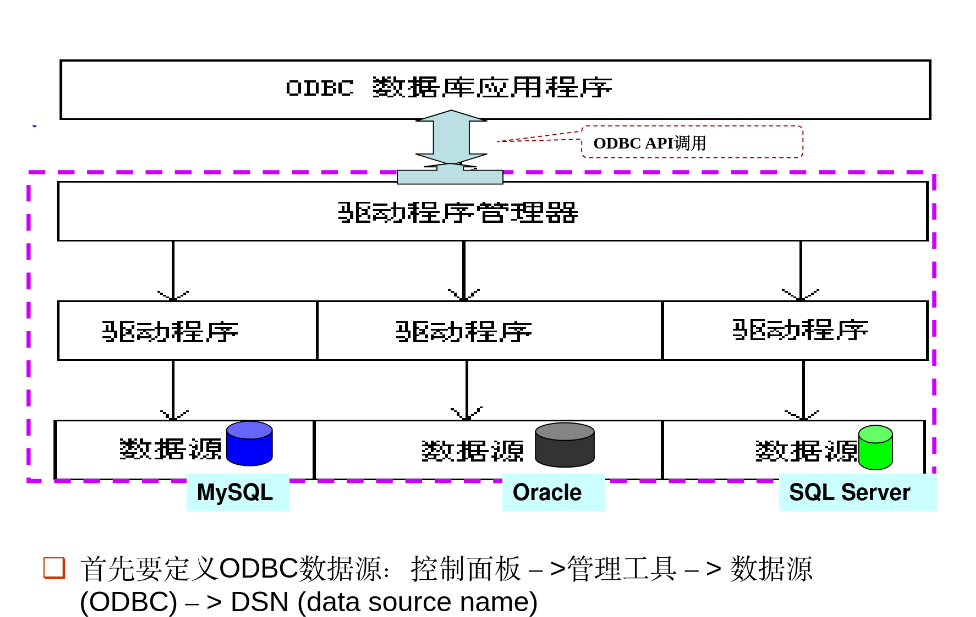
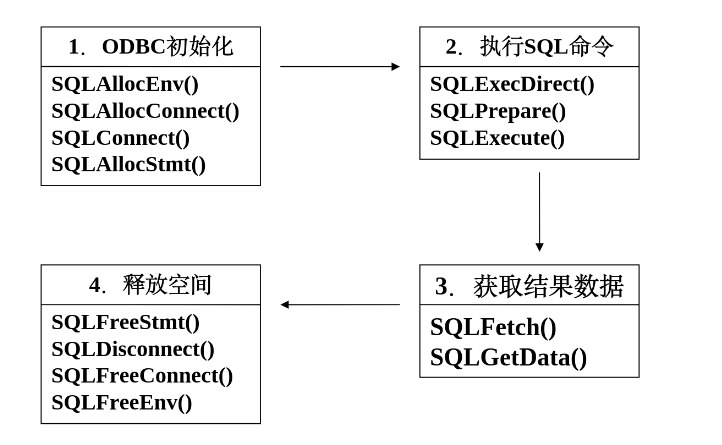
说明:hstmt是一个有效的语句句柄;
szSqlStr和cbSqlStr分别表示将要执行的SQL语句的字符串及其长度。
例子:retcode=SQLExecDirect(hstmt, "delete from book where ISBN=1", SQL_NTS);
说明:删除book表中ISBN=1的记录。SQL_NTS是ODBC的一个常数,当字符串是以NULL结束时,可用它来表示字符串的长度。
TYPE 是用于定义新的数据类型,特别是复合类型(包含多个字段)或枚举类型。
适用于需要定义复杂数据结构的场景,例如需要在表中存储地址信息的多个字段。
复合类型可以包含多个字段,每个字段可以有不同的数据类型。
枚举类型可以定义一组固定的值。
示例:
复合类型:
CREATE TYPE address AS (
    street VARCHAR(255),
    city VARCHAR(100),
    zip_code VARCHAR(10)
);
枚举类型:
CREATE TYPE mood AS ENUM ('happy', 'sad', 'neutral');
Large object types
SQL provides two types of large object data types:
BLOB (Binary Large Object)
Stores large collections of uninterpreted binary data
Examples: images, videos, CAD files
Interpretation is handled by external applications
Maximum size depends on DBMS implementation
CLOB (Character Large Object)
Stores large collections of character/text data
Examples: documents, XML files, long text
Data is interpreted as character strings
Maximum size depends on DBMS implementation
When querying large objects, the database returns a pointer/reference to the data rather than the full object itself. This helps optimize performance and memory usage.
Example usage:
CREATE TABLE students (
    sid char(10) PRIMARY KEY,
    name varchar(10),
    gender char(1),
    photo blob(20MB),
    cv clob(10KB)
);
Integrity Constraints
Integrity constraints guard against accidental damage to the database, by ensuring that authorized changes to the database do not result in a loss of data consistency.
实体完整性、参照完整性和用户定义的完整性约束
完整性约束是数据库实例(Instance)必须遵循的
完整性约束由DBMS维护
Domain Constraints
The check clause in SQL-92 permits domains to be restricted:
Create domain hourly-wage numeric(5, 2)
Constraintvalue-test check(value>=4.00)
--The clause constraint value-test is optional; useful to indicate which constraint an update violated.
为约束命名可以更容易地诊断问题;
Referential Integrity
Let r1(R1) and r2(R2) be the relations with primary keys K1 and K2, respectively.
The subset α of R2 is a foreign key referencing K1 in relation r1, if for every t2 in r2 there must be a tuple t1 in r1 such that t1[K1]=t2[α].
∀t2∈r2,∃t1∈r1,t1[K1]=t2[α]
Referential integrity constraint also called subset dependency, since its can be written as
INSERT:If a tuple t2 is inserted into r2, the system must ensure that there is a tuple t1 in r1 such that t1[K1]=t2[α], 例如如果插入一个员工,则该员工所属的branch_name必须在branch表中存在。
DELETE: If a tuple t1 is deleted from r1, the system must compute the set of tuples in r2 that reference t1:
σα=t1[K1](r2)
如果r2中存在与r1中被删记录匹配的元组
If this set is not empty, then either the delete command is rejected as an error, or the tuples in t2 that references t1 must themselves be deleted (cascading deletions are possible).
UPDATE CASE 1: If a tuple t2 is updated in relation r2 and the update modifies values for foreign key α, then a test similar to the insert case is made:
Let t2′ denote the new value of tuple t2. The system must ensure that
UPDATE CASE 2: If a tuple t1 is updated in relation r1 and the update modifies values for candidate key K, then a test similar to the delete case is made:
Either the update command is rejected as an error, or the tuples in t2 that references t1 must themselves be updated(cascading updates are possible).
When an assertion is made, the system tests it for validity on every update that may violate the assertion. (when the predicate is true, it is Ok, otherwise report error.)
这种测试可能会带来大量的系统开销;因此,断言应该谨慎使用。
Triggers
A trigger is a statement that is executed automatically by the system as a side-effect of a modification to the database.
To design a trigger mechanism, we must:
Specify the conditions under which the trigger is to be executed.
Specify the actions to be taken when the trigger executes.
Triggers were introduced to SQL standard in SQL:1999, but supported even earlier using non-standard syntax by most databases.
for each row
when nrow.level < = (select level
                      from minlevel
                      where minlevel.item = nrow.item)
               and orow.level > (select level
		                        from minlevel
	                            where minlevel.item = orow.item)
begin
	insert into orders
		(select item, amount
		from reorder
	    where reorder.item = orow.item)
end
```

虽然这个trigger不能直接执行外部世界的操作,但是可以记录下需要执行的操作,然后由外部进程来执行。

这个触发器在 `inventory` 表的 `level` 列更新后执行。它会检查更新后的库存量是否低于最低期望库存量,并且更新前的库存量是否高于最低期望库存量。如果满足条件,就会在 `orders` 表中插入一条新的订单记录。这样,外部进程可以读取 `orders` 表中的记录来执行实际的订购操作。
Security involves protection from malicious attempts to steal or modify data. It can be addressed at various levels:
Database System Level: Authentication and authorization mechanisms allow specific users access only to required data.
Operating System Level: Operating system super-users can do anything they want to the database! Good operating system level security is required.
Network Level: Must use encryption to prevent:
Eavesdropping (unauthorized reading of messages)
Masquerading (pretending to be an authorized user or sending messages supposedly from authorized users)
Physical Level: Physical access to computers allows destruction of data by intruders; traditional lock-and-key security is needed. Computers must also be protected from floods, fire, etc. -- (Recovery)
Human Level: Users must be screened to ensure that authorized users do not give access to intruders. Users should be trained on password selection and secrecy.
Forms of Authorization on Parts of the Database
Read Authorization: Allows reading, but not modification of data.
Insert Authorization: Allows insertion of new data, but not modification of existing data.
Update Authorization: Allows modification, but not deletion of data.
Delete Authorization: Allows deletion of data.
Forms of Authorization to Modify the Database Schema
Index Authorization: Allows creation and deletion of indices.
Resources Authorization: Allows creation of new relations.
Alteration Authorization: Allows addition or modifying of attributes in a relation.
Drop Authorization: Allows deletion of relations.
Granting of Privileges
Authorization Graph
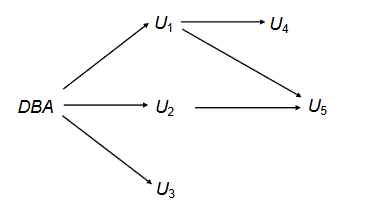
该图的节点是用户。图的根节点是数据库管理员。
考虑对贷款进行更新授权的图。
一个边 Ui→Uj 表示用户 Ui 已将对贷款的更新授权授予用户 Uj。
Grant Statement
The grant statement is used to grant privileges to users.
public, which allows all valid users the privilege granted
A role
privilege-list:
SELECT:allows read access to relation, or the ability to query using the view
Insert: the ability to insert tuples.
Update: the ability to update using the SQL update statement.
Delete: the ability to delete tuples.
References: ability to declare foreign keys when creating relations.
All privileges: used as a short form for all the allowable privileges.
All: used as a short form for all the allowable privileges.
e.g.
GRANTSELECT, INSERTON loan TO U1,U2,U3
WITH GRANT OPTION: Allows a user who is granted a privilege to pass the privilege on to other users.
e.g.
GRANTSELECTON loan TO U1 WITHGRANT OPTION
现在U1不仅有对loan表的查找权限,还可以将这个权限传递给其它的用户
Roles
permiting common privileges for a class of users can be specified just once, by creating a corresponding "role".
Privileges can be granted to or revoked from roles, just like user; roles can be assigned to users, and even to other roles.
Create role teller;
Create role manager;
Grantselecton branch to teller;
Grantupdate (balance) on account to teller;
Grantall privileges on account to manager;
Grant teller to manager;
Grant teller to alice, bob;
Grant manager to avi;
Revoking Authorization
Revoking authorization is the inverse of granting authorization.
The revoke statement is used to revoke authorization.
Revokeselecton branch from U1, U3 cascade;
--移除U1和U3在branch上的select权限,如果有依赖也一并移除Revokeselecton branch from U1, U3 restrict;
-- 移除U1和U3在branch上的select权限,如果有依赖就fail
Audit Trails
An audit trail is a log of all changes (inserts/deletes/updates) to the database along with information such as which user performed the change, and when the change was performed.
Used to track erroneous/fraudulent updates.
Can be implemented using triggers, but many database systems provide direct support.
语句审计:
E.g., audit table by scott by access whenever successful ---- 审计用户scott每次成功地执行有关table的语句 (create table, drop table, alter table)。
说明:hstmt是一个有效的语句句柄;
szSqlStr和cbSqlStr分别表示将要执行的SQL语句的字符串及其长度。
例子:retcode=SQLExecDirect(hstmt, "delete from book where ISBN=1", SQL_NTS);
说明:删除book表中ISBN=1的记录。SQL_NTS是ODBC的一个常数,当字符串是以NULL结束时,可用它来表示字符串的长度。